






爱博客 爱博客人 人人爱博客
👆脚本地址
通过@chavy的Env.js,实现了对Loon,Quantumult X等的适配,并支持BoxJs
原作者使用说明
🌟仓库地址(欢迎star✨)
🏠BoxJs订阅地址
更新了部分图标,欢迎体验~
感谢@xinian设计新图标
🧑🏻💻作者 @evilbutcher
#locDD多大佬整合-OneDrive
wget -N --no-check-certificate https://raw.githubusercontent.com/veip007/dd/master/dd-od.sh && chmod +x dd-od.sh && ./dd-od.sh
#locDD多大佬整合-GoogleDrive
wget -N --no-check-certificate https://raw.githubusercontent.com/veip007/dd/master/dd-gd.sh && chmod +x dd-gd.sh && ./dd-gd.sh
#千影大佬DD(自定义密码)
wget -N --no-check-certificate "https://raw.githubusercontent.com/chiakge/installNET/master/Install.sh" && chmod +x Install.sh && ./Install.sh
#cxthhhhh魔改版本
#centos预备#
yum install -y xz openssl gawk file wget
#debain预备#
apt-get install -y xz-utils openssl gawk file
wget --no-check-certificate https://shell.p1e.cn/reinstall/Network-Reinstall-System-Modify.sh && chmod a+x Network-Reinstall-System-Modify.sh
#DD例子
bash Network-Reinstall-System-Modify.sh -Debian_9
#密码:cxthhhhh.com
wget -N --no-check-certificate https://raw.githubusercontent.com/veip007/dd/master/dd-od.sh && chmod +x dd-od.sh && ./dd-od.sh
#locDD多大佬整合-GoogleDrive
wget -N --no-check-certificate https://raw.githubusercontent.com/veip007/dd/master/dd-gd.sh && chmod +x dd-gd.sh && ./dd-gd.sh
#千影大佬DD(自定义密码)
wget -N --no-check-certificate "https://raw.githubusercontent.com/chiakge/installNET/master/Install.sh" && chmod +x Install.sh && ./Install.sh
#cxthhhhh魔改版本
#centos预备#
yum install -y xz openssl gawk file wget
#debain预备#
apt-get install -y xz-utils openssl gawk file
wget --no-check-certificate https://shell.p1e.cn/reinstall/Network-Reinstall-System-Modify.sh && chmod a+x Network-Reinstall-System-Modify.sh
#DD例子
bash Network-Reinstall-System-Modify.sh -Debian_9
#密码:cxthhhhh.com
#投稿 来自 @paulkm
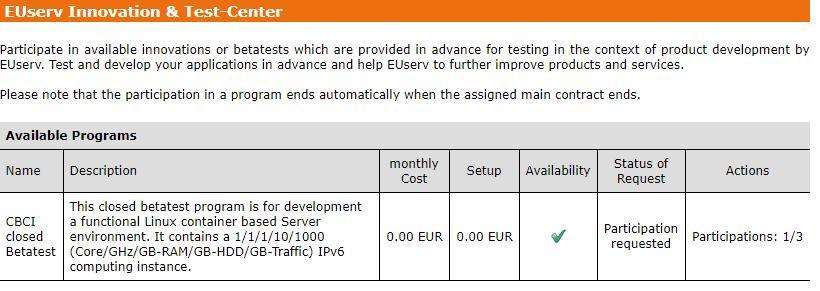
EUServ貌似又有新免费V6小鸡了:打开控制面板,选中任意一个Contract,在左下方找到“Innovation & Test-center”,可以看到一个叫“CBCI closed Betatest”的测试,点击加入即可 过几分钟会有一个新的免费Contract出现,不知道能用多长时间,以前用免费套餐的也可以申请
详见图片: https://p.ananas.chaoxing.com/star3/origin/d20d4375591cdffd38f89a217ae5a0b4.jpg
EUServ貌似又有新免费V6小鸡了:打开控制面板,选中任意一个Contract,在左下方找到“Innovation & Test-center”,可以看到一个叫“CBCI closed Betatest”的测试,点击加入即可 过几分钟会有一个新的免费Contract出现,不知道能用多长时间,以前用免费套餐的也可以申请
详见图片: https://p.ananas.chaoxing.com/star3/origin/d20d4375591cdffd38f89a217ae5a0b4.jpg
☁️ filestash:一个支持多接口的 Web 端文件管理器
GitHub | Demo | Wiki
👉 Features:
- 支持对接 S3 / SFTP / FTP / GIT / WebDav / CalDAV / Dropbox / Google Drive / Gitea 等程序和服务
- 支持图片预览和管理
- 支持预览和编辑 Office 文件
- 带有视频 / 音频播放器,支持多种格式
- 移动端友好
👉 安装:
详见 Wiki,提供了普通安装和 Docker 安装两种方式,还很贴心地给出了傻瓜式 Nginx 配置
filestash 也是一个🐦开发项目,老实说我不太喜欢这个云盘管理器的 UI
但是体验之后发现同样是依托于第三方类 OSS 的在线网盘展示项目,filestash 对文件预览的支持非常 awesome。图片、视频、音频等文件支持格式很多,Office 方面还对接了 ONLYOFFICE。也就是说,用户不仅可以预览,还可以做一些高级 edit
不过目前不支持 OneDrive 有些许遗憾,相信大家早就希望加入这个功能了
👀 回顾:
1️⃣ ShareList:一个支持多种网盘系统快速挂载的目录项目
2️⃣ zfile:一个支持各种对象存储和本地存储的在线文件目录程序
3️⃣ Cloudreve:支持多家云存储的云盘系统
频道:@NewlearnerChannel
2020医药卫生职称考试考点精华重点知识点笔记考试大纲等
https://pan.baidu.com/s/188pdT6er3Hs6Nl5KLW6E8g
提取码:pepq
芒果TV官方年费65
以前那个半成品还得用别人的公众号和自建机器人,虽说这个库存监控页没有对应的TG机器人可以提醒了,但是搭建难度远远小于那个半成品。
演示页:https://vpsand.com/
github项目地址:https://github.com/qsbaq/vps-stock-monitor
作者博客项目介绍:https://www.jiloc.com/46825.html
巧用腾讯云函数,解锁兔小巢实时消息推送!https://support.qq.com/products/1368/blog/12204
CCTV-1蓝光,http://111.13.111.242/otttv.bj.chinamobile.com/PLTV/88888888/224/3221226226/1.m3u8 CCTV-2蓝光,http://111.13.111.242/otttv.bj.chinamobile.com/PLTV/88888888/224/3221226230/1.m3u8 CCTV-3蓝光,http://223.110.241.130:6610/gitv/live1/G_CCTV-3-HQ/.m3u8 CCTV-4蓝光,http://111.13.111.242/otttv.bj.chinamobile.com/PLTV/88888888/224/3221226314/1.m3u8 CCTV-5蓝光,http://39.134.168.91/PLTV/1/224/3221225556/index.m3u8 CCTV-6蓝光,http://223.110.243.139/PLTV/3/224/3221225548/index.m3u8 CCTV-7蓝光,http://111.13.111.242/otttv.bj.chinamobile.com/PLTV/88888888/224/3221226234/1.m3u8 CCTV-8蓝光,http://39.134.168.91/PLTV/1/224/3221225562/index.m3u8 CCTV-9蓝光,http://111.13.111.242/otttv.bj.chinamobile.com/PLTV/88888888/224/3221226236/1.m3u8 CCTV-10蓝光,http://111.13.111.242/otttv.bj.chinamobile.com/PLTV/88888888/224/3221226227/1.m3u8 CCTV-11蓝光,http://111.13.111.242/otttv.bj.chinamobile.com/PLTV/88888888/224/3221226315/1.m3u8 CCTV-12蓝光,http://111.13.111.242/otttv.bj.chinamobile.com/PLTV/88888888/224/3221226228/1.m3u8 CCTV-13蓝光,http://39.134.168.91/PLTV/1/224/3221225572/index.m3u8 CCTV-14蓝光,http://111.13.111.242/otttv.bj.chinamobile.com/PLTV/88888888/224/3221226229/1.m3u8 CCTV-15蓝光,http://111.13.111.167/otttv.bj.chinamobile.com/PLTV/88888888/224/3221226333/1.m3u8 CCTV-16蓝光,http://ott-live.olympicchannel.com/out/u/OC1_1.m3u8 CCTV-17蓝光,http://111.13.111.242/otttv.bj.chinamobile.com/PLTV/88888888/224/3221226318/1.m3u8
Ventoy:一个支持制作多系统启动 U 盘的工具
Web | Download
👉Features:
- 支持直接从 ISO 文件启动
- 无差异支持 Legacy + UEFI 模式
- UEFI 模式支持安全启动
- 支持超过 4GB 的 ISO 文件
- 支持大部分常见操作系统, 已测试260+ 个ISO文件
- 提出 "Ventoy Compatible" 概念
- 支持插件扩展
- 不影响 U 盘普通使用,可做存储
- 版本升级时数据不会丢失
- 无需跟随操作系统升级而升级Ventoy
👀 大家可能惯常使用Rufus或者UltraISO等软件来制作可启动U盘,反复地对U盘进行格式化是常规操作。Ventoy作为一个制作可启动U盘的开源工具,可以免去反复格式化的重复操作,只需往U盘中放入你所需的ISO文件。
💿 同时,在U盘内你可以同时存放多个ISO镜像文件,镜像文件之间不会造成冲突。启动引导时,Ventoy会提供ISO菜单,以方便定位至所需的启动镜像文件,测试证明其具有良好的兼容性。
⚙️ 以上特性得益于独特的分区设计。Ventoy会将U盘分为两个区,其中一个区被格式化为exFAT文件系统,ISO会被存储于该分区下。除了可存储多个ISO镜像文件外,Ventoy制作的U盘也能用作日常储存,不用担心冲突。
频道:@NewlearnerChannel
思有云 - IOIOX
Microsoft 365 开发者计划 E5 订阅全自动调用 API 续签
Microsoft 365 开发者计划 E5 订阅全自动调用 API 续签
wget -N --no-check-certificate "https://raw.githubusercontent.com/tadple/mini-status-shell/master/mini-status.sh" && chmod +x mini-status.sh && ./mini-status.sh
一键脚本
一键脚本

Rin404°
Typecho丨博客实用插件推荐
Typecho丨博客实用插件推荐
